


Seesaw
3.93.06K Reviews
App Specs
- Version
- 10.139.0
- Updated On
- License
- Free
- Downloads
- 5,000,000+
- Developer
- Seesaw Learning
- Categories
- Education
- Platform
- Android
Screenshots
 Analysis by AppCompare
When I look at Seesaw as an education app, I see a tool built around making classroom learning visible to children, teachers, and families. I used it with that purpose in mind rather than treating it like a general note-taking app or a simple homework inbox. The difference matters: its value depends on how thoughtfully a school or teacher organizes activities, responses, and communication.
Seesaw is developed by Seesaw Learning and is available for free, with an Everyone content rating. It has been around since June 24, 2015, and the current version is 10.139.0 for devices running iOS 9 or later. Its presence on more than 5 million devices and an average rating of 3.9 from roughly 26,000 ratings suggest a widely used product with a mixed but substantial user base. I would not read that rating as a verdict by itself, because the experience can change considerably depending on whether you are a student, parent, or teacher and how a classroom uses the platform.
What Seesaw feels like in everyday classroom use
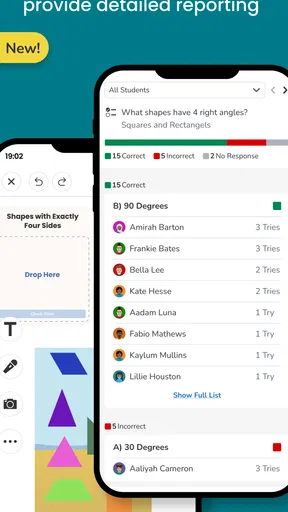
The central idea is straightforward: learning becomes something a child can create and share, not just something they submit as a finished answer. A teacher can use the app to present an activity, while a student can respond in a format that suits the assignment. In practice, that may make more sense for younger learners than asking them to navigate a collection of separate services.
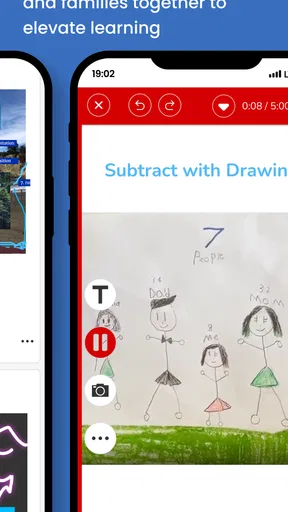
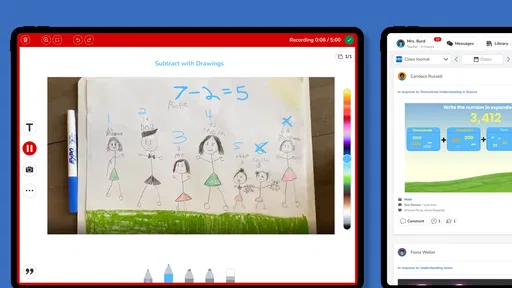
What I appreciate most is the emphasis on showing the process. A written response can explain what a child thinks, but a recorded explanation, drawing, photograph of work, or annotated answer can reveal how the child reached that point. That makes Seesaw more interesting than a conventional worksheet system, particularly in early education and primary classrooms where students may not yet express everything comfortably through long typed answers.
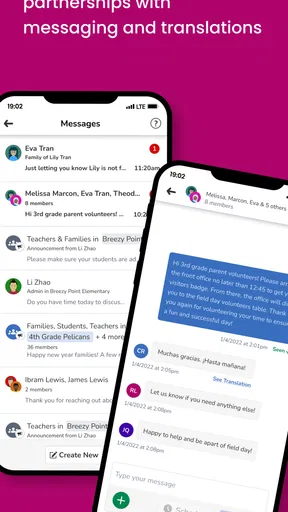
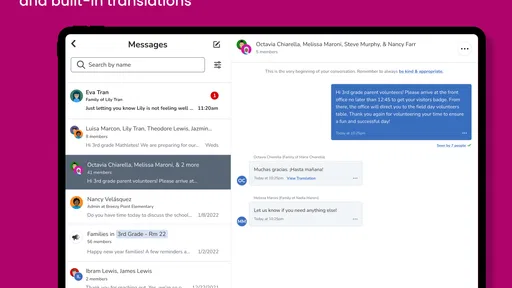
There is also a useful bridge between school and home. A family member can see the kind of work being shared and gain a clearer sense of what the child is practicing. That is more helpful than a vague message saying that an assignment was completed. At the same time, this connection creates a responsibility: families need to understand when they are viewing classroom work, when they are receiving communication, and when a child is expected to act independently.
Why the format suits younger learners
Many education platforms assume that students are comfortable with menus, file names, folders, and formal submissions. Seesaw can feel more approachable because the work itself is the focus. A child can respond creatively instead of translating every idea into a document designed for adults.
That flexibility is especially valuable for students who are still developing handwriting, typing, language, or confidence in front of a class. A teacher may learn more from a short spoken explanation or a marked-up image than from an incomplete paragraph. I would still avoid assuming that every child benefits equally. Some students need very clear boundaries, and an open-ended creative response can become confusing if the instructions are not carefully prepared.
Worth Reading Before You Choose

EA SPORTS FC Mobile 26 Is a Bigger Football Game, but It Takes Time

Flipboard Shows What News Apps Must Do Beyond the Feed

Switching to Android Auto Means Rethinking Your Driving Routine

Google Calendar Makes a Crowded Week Easier to Manage

Ludo King Makes the Most of the Minutes Between Plans

Baby Panda World Brings Quick Play to Modern Phones, but Its Game Library Feels Busy
For teachers, the practical advantage is not simply collecting files. A well-organized activity can preserve a record of student thinking and make feedback more connected to the work. The drawback is that this only works when the teacher maintains a consistent routine. If activities are named inconsistently or communication is mixed with assignments, families may spend more time searching than learning.
A realistic home routine
Imagine a child returning home after a lesson about reading. Instead of carrying a worksheet, the child opens the classroom activity, reads a prompt, and records a short explanation of a favorite character. A parent can listen to the response, ask a useful follow-up question, and leave the child to complete the task rather than taking over. The teacher later has more than a tick beside a name: there is evidence of the child’s understanding and expression.
That scenario also shows the app’s limitation. It works best when everyone agrees on the routine. If a parent expects instant replies, a child struggles to find the correct activity, or the teacher posts too many unrelated items together, the same workflow becomes stressful. Seesaw can support a calm connection between home and school, but it cannot create that structure by itself.
Trust starts with the account context
Because this is an education app used around children, I pay closer attention to account roles and visibility than I would with a casual productivity tool. The important question is not only whether the interface is easy; it is whether each person understands what they are doing and who may see the result.
My practical advice is to treat the classroom invitation or sign-in process as the foundation. Use the account route supplied by the school or teacher, check that the child is entering the intended class, and avoid creating extra accounts simply to experiment. A duplicate profile can make work appear missing or place activity in the wrong space, which is a trust problem even when nothing malicious has happened.
I also recommend checking the device before a child begins. Confirm which account is active, whether the app is being used by the intended student, and whether a family member has accidentally left another account open. These are small checks, but they matter when work includes a child’s voice, image, name, or personal expression.
Visible choices matter more than vague reassurance
When I review a child-focused education service, I look for moments where the user can make an informed choice: selecting what to submit, deciding whether a recording is necessary, and understanding whether a response belongs to a private classroom activity or a wider audience. I do not treat a polished interface as proof of strong privacy by itself.
Seesaw’s usefulness comes partly from sharing student work, so families should discuss what that means in their particular classroom. A child may think of a drawing as a private creation, while the activity requires it to be submitted for teacher review. Before using photos or recordings, I would explain the purpose in simple language and encourage the child to ask when something feels uncomfortable.
Teachers have an equally important role. A prompt asking students to photograph work should be specific about what belongs in the frame. There is a meaningful difference between photographing a worksheet and photographing a bedroom, family member, school badge, or visible address in the background. The app may be the delivery mechanism, but careful instructions determine much of the real-world exposure.
Data-sensitive moments deserve extra care
The most sensitive situations are not always obvious. A student recording a voice response may reveal more than the answer itself. A photograph can include other children, personal possessions, names, or location clues. A family comment may contain information that was not intended for the entire classroom audience. These details are easy to overlook when the task feels ordinary.
I would establish a simple rule at home: before submitting, pause and check the edges of the image and the background of any recording. If the activity does not require a face, do not include one. If a child can explain the answer without mentioning a classmate, use the more limited explanation. This is not about making children fearful of technology; it is about teaching them that sharing should have a purpose.
Another useful habit is separating school communication from casual conversation. If a child wants to tell a friend something unrelated to the assignment, the classroom activity is not necessarily the right place. Keeping posts focused makes the learning record easier to understand and reduces accidental disclosure.
What teachers should decide before introducing it
A teacher considering Seesaw should first decide what the app is for. Is it mainly for student portfolios, activity responses, family visibility, or teacher communication? It can be tempting to use one platform for everything, but that can produce clutter and make it harder to distinguish an important instruction from an old piece of work.
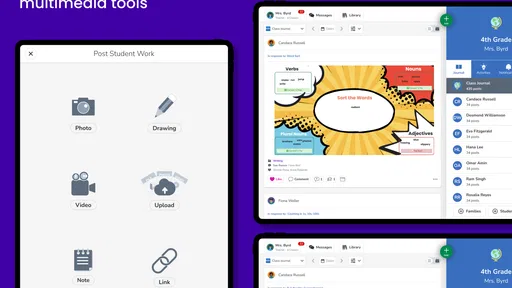
I would begin with a small number of repeatable activity types. For example, one format could be used for a short written response, another for an audio explanation, and another for a photo of physical work. Consistent patterns help students focus on the subject rather than learning a new submission process each time.
Teachers should also set expectations for feedback. If a student believes every post will receive an immediate reply, delays may feel like rejection. A clear classroom routine—such as explaining when work is reviewed and how corrections are handled—protects both student confidence and teacher time.
The strongest use case is not maximum activity. It is purposeful documentation. A small collection of meaningful responses can tell a better story about progress than a large stream of repetitive uploads.
How it compares with familiar alternatives
Compared with email, Seesaw is better suited to keeping a child’s work connected to a classroom activity. Email can handle messages and attachments, but it often separates the instruction, response, and follow-up across different threads. That separation becomes difficult for younger students and for families trying to understand the context.
Compared with a traditional learning management system, Seesaw can feel more child-friendly and more expressive. Many formal systems are excellent at schedules, documents, grades, and structured course materials, but they may feel designed around adult workflows. Seesaw’s strength is the student artifact: the drawing, recording, photograph, or explanation that shows learning in a more recognizable form.
On the other hand, a full learning management system may be the better choice for older students who need detailed calendars, complex assessment structures, long-form writing, or advanced file organization. Seesaw is not automatically the right replacement for every school platform. I see it as particularly useful where the act of showing understanding matters as much as submitting a conventional file.
It also differs from a family messaging app. A messaging tool may be faster for announcements, but it usually does not provide the same learning-centered context. Conversely, if a school only needs occasional notices, introducing a student portfolio workflow could be unnecessary. The right choice depends on whether the classroom needs evidence of learning or simply a communication channel.
Where the experience can become frustrating
The first source of friction is variation between classrooms. Two teachers can use the same app in completely different ways. One may create a clear sequence of activities, while another may rely on broad labels and frequent updates. A parent judging the platform after one confusing classroom should remember that organization is part of the experience.
The second issue is that creative flexibility can increase the number of decisions a student must make. Should the answer be typed, drawn, photographed, or recorded? That freedom is valuable when the teacher explains the goal, but it can slow down a child who wants a single obvious path.
There is also a trade-off between rich documentation and digital overload. Saving every small response may create a crowded record that is hard to revisit. I would rather see students keep a few carefully chosen examples with useful reflection than upload everything without a clear reason.
Families who want a conventional gradebook, detailed academic planning, or a single dashboard for every school service may find Seesaw incomplete for their needs. Students who are uncomfortable recording their voice may also need an alternative response method. A good classroom should offer a suitable way to participate without treating one format as the measure of effort.
Practical checks for families and students
Before using the app regularly, I would ask the teacher four practical questions in ordinary language: who can see a student’s post, how feedback is delivered, what kind of work should be shared, and how families should respond to messages. These questions are more useful than assuming the app behaves identically in every school.
On a shared device, sign out or switch accounts carefully after use. On a child’s personal device, review notifications together so the child knows which alerts require attention and which can wait. I would also encourage the child to show an adult the activity before submitting anything that includes a recording, photograph, or another person.
If a post seems to contain information that does not belong in a classroom record, pause rather than rushing to submit it. Ask whether the assignment can be completed with a crop, a written answer, or a simpler explanation. That small decision teaches digital judgment while preserving the learning objective.
For teachers, a short orientation activity is worthwhile. Let students practice opening an activity, creating a response, reviewing it, and correcting it before the first important assignment. This exposes account and navigation problems early, when they are easier to solve and less embarrassing for students.
Who will get the most from it
I would recommend Seesaw most readily to early-years and primary classrooms where students benefit from visual, spoken, and hands-on responses. It is also a strong fit for teachers who want families to see learning in progress rather than only receiving occasional summaries.
It can help students who have ideas but find conventional writing restrictive, provided the teacher offers meaningful choices instead of turning every task into a recording. It may also suit project-based activities where a sequence of images, notes, and explanations shows development over time.
I would be more cautious for a student who needs a highly formal academic workspace, a family that wants extensive scheduling and grading tools, or a school that has not agreed on account and communication routines. In those cases, a more structured learning management platform may be easier to manage, with Seesaw used only for selected activities if the school sees a clear benefit.
My cautious verdict
After looking at the app through the lens of trust and everyday usefulness, I think Seesaw earns its place when the people using it make deliberate choices. Its strongest idea is giving children a way to show understanding in their own voice and giving families a more concrete view of classroom work. That can make learning feel personal rather than hidden inside a grade or a completed worksheet.
Still, I would not recommend adopting it casually just because it is free or popular. The free price removes a financial barrier, but it does not remove the need for clear classroom rules, careful sharing, and sensible account habits. The platform is only as trustworthy in practice as the instructions surrounding each activity and the choices users understand before they post.
My final view is positive but conditional. Seesaw is a useful education app for schools that want expressive student work, family connection, and a visible learning record. I would choose it over email for child-centered activity sharing, while choosing a more formal system for advanced course administration. If your teacher provides clear routines and your family is comfortable checking what gets submitted, it is worth trying. If the classroom lacks structure or expects the app to solve every communication and assessment need, the experience may be more confusing than helpful.
Pros
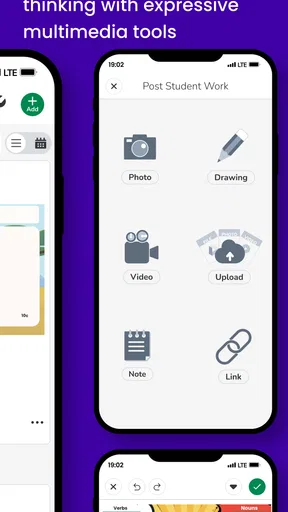
- Simple interface makes classroom activities easy for young students.
- Supports photos
- videos
- drawings
- notes
- and voice recordings.
- Parents can follow learning progress and view shared work.
- Useful for portfolios that document student growth over time.
- Works well for remote learning and classroom-home communication.
Cons
- Some features require a paid school or family subscription.
- Uploading media can use significant storage and mobile data.
- Notification settings may become overwhelming for active classes.
- Requires reliable internet access for the smoothest experience.
- Privacy depends on careful management of classroom sharing settings.
FAQs for Seesaw
What is Seesaw, and who is it designed for?
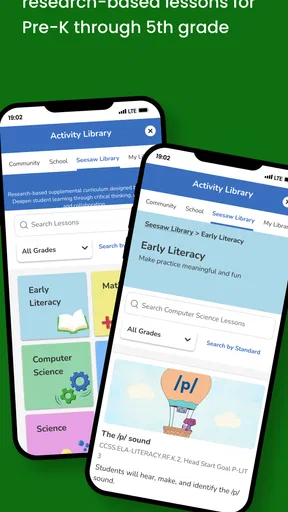
Seesaw is a digital learning platform designed mainly for elementary and early-years classrooms. It gives students a place to complete activities, create digital work, and share their learning with teachers and, when enabled, family members. Teachers can use it to organize assignments, provide feedback, and document progress. The exact tools available may depend on the school’s account type and classroom setup.
Can parents and family members use Seesaw to view a child’s work?
Yes, Seesaw can allow families to view a student’s approved posts, announcements, and classroom updates through a family account or access invitation from the school. Family access is controlled by the teacher or school, so not every activity will necessarily be visible immediately. Parents should use the official invitation details and contact the teacher if they have trouble joining or seeing updates.
Does Seesaw work on both Android and iPhone or iPad?
Seesaw is available for mobile devices running supported versions of Android and iOS, and it can also be accessed through a web browser on compatible computers. Before downloading, check the current store listing for operating-system requirements, available storage, and recent updates. Performance may vary depending on the device, internet connection, school settings, and whether students are uploading photos, videos, or other large files.
Is Seesaw free to download and use?
The Seesaw app can generally be downloaded without an upfront charge, but access to features depends on the account provided by a teacher, school, or district. Some schools may use paid plans or upgraded features, while others may offer only the tools included in their existing subscription. Downloading the app alone does not guarantee classroom access; users usually need a class code, invitation, or school login.
What privacy and safety features should users know about before using Seesaw?
Seesaw is built for classroom communication, and student content is normally shared within the audiences selected by the teacher or school. However, users should still review permissions and avoid posting sensitive personal information. Photos, recordings, and assignments may require access to the camera, microphone, or device storage. Families should also understand that school administrators and teachers manage account access, moderation, and content visibility.


